
Educational
What makes a great F2P Social VR Multiplayer game?
10 tips to design high-growth, low-churn, free-to-play multiplayer VR games.


1. Know your market & where they hang out
To build what players want, you need to know who you are making your game for — your market. A good way to identify your market is to start by determining three things:
- The genre and subgenre of your game (e.g., Battle Royale, first-person shooter)
- The demographic playing your game (e.g, by age: 13 - 18 year olds and by location: e.g., US )
Knowing who your target audience is makes it easier to build what they want, speak their language, and release in cycles that match player behavior.
2. Make your core game loop compelling
Part of what makes your game great is having a compelling core game loop. This is the series of actions that players will repeatedly take within your game. Here are some examples of successful game loops in the free-to-play social VR multiplayer game space.
Example: Gorilla Tag
Gorilla tag introduced the gorilla movement mechanic in VR, which allows you to navigate within the gameworld by swinging your arms. Their core game loop is:
- Join a lobby: Players enter a VR lobby with others, either in private or public
- Play tag: one or more players start as “lava monkeys,” whose goal is to tag the other gorillas. Non-lava players can use arm-based movement to run, climb, and evade being tagged.
- Tag and Switch: When a lava monkey tags another player, the tagged player becomes the new lava monkey. The round continues until all players except one are tagged.
- Repeat: The loop resets—with one player as the lava monkey —and the cycle starts again.
Example: Animal Rivals
Animal Rivals is a free-to-play multiplayer game that combines gorilla movement (popularized by gorilla tag) with battle royale. Here’s the core game loop:
- Join a Multiplayer Lobby: You enter a game mode like duel, Team Deathmatch, or Infected.
- Battle/Compete Using Animal Movement: Use parkour and shooter mechanics against other players, trying to score points or survive.
- Earn Coins and Progress: Complete matches or contracts to earn Foundation Coins, unlock weapons, wild loadouts, and cosmetics.
- Customize and Upgrade: Use coins to upgrade gear and your animal avatar for style and strategic advantages.
- Repeat: Keep entering matches, climb leaderboards, participate in weekly events or updates.
Example: Big Ballers VR.
BigBallers offers VR sports experiences and was created by [Doge Labs], the creators of PlaySafe. It takes something people already love in real life and brings it to Virtual Reality.
- Join a park/lobby: Enter a multiplayer park with other players.
- Select a sport/mode: Choose from basketball, American football, baseball, mixed reality mini-games, and Blade Ball-inspired game modes.
- Compete in matches: Play rounds of various sports, such as
- Reputation & Progression: Winning earns you reputation, cosmetics, and rank progression (which also provides a sense of social status in the game)
- Customize & Socialize: Use in-game currency or rewards to customize your avatar with hundreds of cosmetics.
- Repeat: Join new matches or switch sports, with fresh content being regularly released.
The key thing to note here is that each of these games has a repeatable, fun core gameplay loop. A good way to know if your core game loop is compelling is to ask yourself: Is the game fun without the art or story? If the answer is yes, adding the art/story will amplify the fun. If your game is boring without the art or the story, especially in F2P VR multiplayer games, then odds are high that no amount of art or story will make the game more fun. A great read on how to design fun games is A Theory Of Fun For Games, by Raph Koster.
2. Player comfort is key
PatentPC’s 2025 meta-analysis shows that 60% of early VR quitters cite nausea as the reason they never come back. This directly erodes D1 retention and potentially inflates the cost per install by up to 25%. If you want your free-to-play multiplayer game to win over players, it needs to be comfortable for them over an extended period. Comfort lets players play for longer, increasing playtime and retention. It also makes it easier for VR newcomers to pick up your game.
Here are a few tips on how to maximize player comfort in VR.
- Implement teleportation/snap-turn locomotion in your VR game. Avoid free movement with the camera to drastically reduce nausea and disorientation.
- Add fixed visual anchors to your scene. This could be giving your players a “body” or providing HUD elements that move with the player’s head. It helps users orient themselves in your game world.
- Avoid uncontrolled camera movements. Only allow movements driven by player input (head or controller). Unless you’re making a rollercoaster game (or equivalent), avoid moving the camera automatically or forcing acceleration or deceleration outside of the player’s control.
Lastly, encourage frequent breaks and provide gentle onboarding for new players. Do not throw them into the most intense VR experiences at the beginning.
3. Build a smooth onboarding & tutorial experience
If players don’t know how to play your game, and it is not immediately apparent to them how they get from point A to point B, they won’t stick around. Your onboarding experience is a critical part of reducing player churn, especially for D1 and D7 retention.
Having a smooth onboarding experience ensures that players can learn the mechanics of your game seamlessly without being overwhelmed. Inadvertently, this improves player retention (especially with new players, with studios seeing upwards of a 10-15% improvement in D7 & D30 retention)
Here are some pointers on how to build a smooth onboarding experience for your players:
- Make it interactive and contextual. In VR, use hands-on guided interactions instead of pop-up text. Teach controls & mechanics in a controlled low-pressure environment. Let players try each mechanic as they learn it and offer gentle corrections or feedback.
- Onboard in Short, Digestible steps. Break down your tutorials into clear, single-objective segments. Teach only what is necessary for the next step and let players progress at their own pace. Allow for tutorial replayability so players can easily revisit any lesson.
- Layer in Multiplayer & social features gradually. Start the tutorial in a solo or low-pressure multiplayer zone (e.g., with friendly, forgiving bots), then gradually introduce fundamental multiplayer elements. Show core social features like communication, teaming, and safe interactions in a controlled environment (such as a public lobby) before dropping players into the main game.
4. Encourage social interactions while avoiding player toxicity
Social interactions in F2P multiplayer games drive revenue. Socialized players pay and play more. Social features increase engagement, retention, and monetization. Socialized players show 2% higher spend and 9% longer playtime compared to non-socialized players. It is also more likely that players will spend on cosmetics if they can show them off to their friends.
5. Copy what works, then remix
Steve Jobs once said, “Good artists copy; great artists steal.” Your probability of success is higher when you go with proven models. This is why most film studios prefer making sequels to franchises that have been proven to work rather than innovating on new ones.
Simply copying a game word-for-word will not differentiate you from the incumbents. Instead, here are a few ways you can effectively copy what works:
- Same game concept, different genre: Animal Company took the “Roblox” concept and brought it to VR.
- Combining genres/concepts: Animal Rivals combined Battle Royale (Fortnite’s core game mode) with Gorilla movement (a popular movement type in VR popularized by Gorilla Tag)
6. Implement Progression, Rewards & Goals
Players need to feel like they are making progress in their game. This could mean getting better at the game. As a game dev, you must find ways to acknowledge and reward players as they get better at playing your game. A common way to handle progression and rewards is to have some kind of
7. Monetize Fairly
Pay-to-win games work in the short term but suffer from high churn rates in the long term. Players do not appreciate it when the only way to become powerful is by paying. Some practical ways to monetize fairly and increase player retention include:
- Prioritize Non-P2W items: Monetize skins, avatars, and visual upgrades. BigBallers and Animal Rivals are among the top VR earners. Gorilla Tag has also generated more than $100 million in revenue as a free-to-play game.
- Provide ways for players to earn the currency needed to unlock items. Make paying optional and let fun drive purchases.
- Incentivize engagement and social play. Reward players for daily logins and multiplayer teamwork with cosmetics or currency. Discourage toxic behavior by using AI moderation systems such as PlaySafe.
- Have transparent pricing & refund policies—list prices and rewards openly. Make buying, earning, and refunding simple for your F2P players.
- Respect player time. Keep the progression system meaningful and avoid long, tedious unlocks without intermediary unlocks to retain player engagement.
8. Iterate fast and gather feedback
Players can easily get bored if they feel the game lacks new or exciting content. Conversely, when building your game, it is essential to architect it so you can easily add or remove content without requiring significant engineering changes. This will, in turn, increase your iteration speed when keeping content fresh, which will keep players coming back and improve retention.
Another way to keep players engaged in your F2P multiplayer games is to host in-game events.
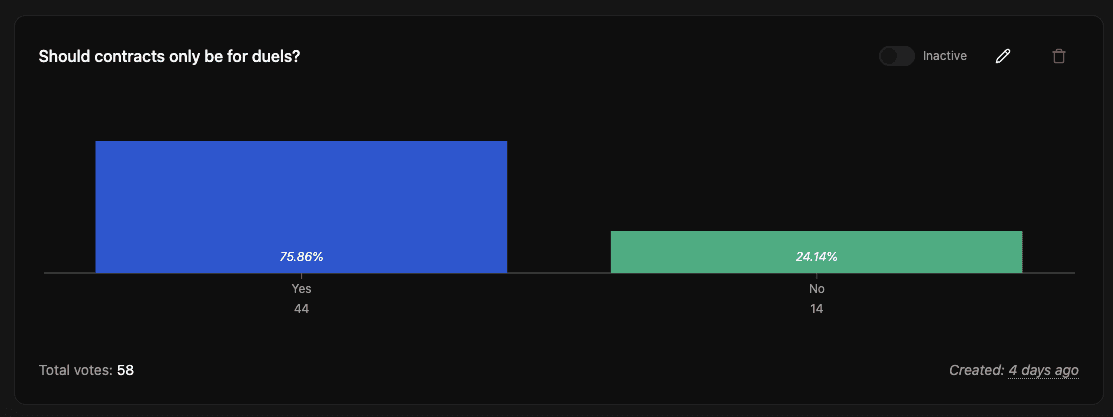
Lastly, on gathering feedback: in-game polls allow you to gather feedback from your players while they are playing. This is opposed to polling your players on Discord, which, while useful, isn’t entirely representative of your playerbase. PlaySafe is a simple way to implement such polls in your games at no upfront cost. You can try it out for free here. Below is a screenshot of an actual poll run in PlaySafe that helped guide the direction of Animal Rivals, a popular VR shooter game.
9. Leverage Community-Generated Content for Virality
Encourage your players to record gameplay clips in your game. This means your game also needs clip-worthy moments that are easy to understand for people who don’t play it.
A few ways to make your game more shareable from a game design perspective are:
- Design for share-ability & ease of recording. Integrate highlight and replay systems into your game, and options for directly sharing to social media or Discord. Structure gameplay so that every match generates short, meaningful clips, memes, or achievements that players may want to share.
10. Measure your core metrics
Here are the four metrics you should generally measure and track to know how your game is doing:
- Retention: Day 1 (D1), Day 7(D7), and Day 30(D30) retention numbers. This is the number of players (relative to your entire playerbase) that are still playing your game after 1, 7, and 30 days, respectively. Higher is better for retention.
- Churn: How many players stop playing your game on D1, D7, and D30? Lower is better.
- Playtime: How long do players play for on average? Longer is better. A more extended playtime is often associated with a higher retention rate. To maximize playtime in VR, ensure players have sessions that are long enough to be fun but short enough to avoid exhaustion.
- Growth rate: How fast is your game growing? Is the playerbase going up or down? By how much? These are all critical questions to answer.
- Monetization: What is the total value of your economy? As a general rule of thumb, it should be possible for players to spend at least $1,000 in your game.